

A board can pass visual inspection, look perfect under the microscope and still fail the first time a customer powers it up. The usual cause is not bad luck, it is a test process that depends on a person with a multimeter and a checklist. A PCB test jig replaces that guesswork with a fixture and software that check every board the same way, every time, in seconds. Here is what a test jig is, what goes into one and how to tell when your product is ready for one.
What Is a PCB Test Jig?
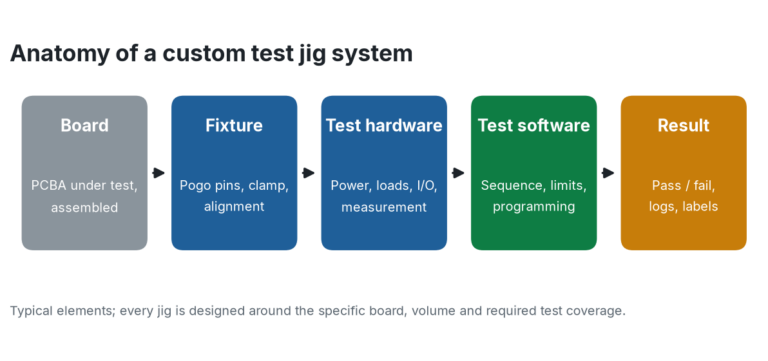
A PCB test jig, also called a test fixture, is a custom-built holder that connects an assembled board to test equipment. The board is placed in the fixture, clamped down and contacted by spring-loaded pins (often called pogo pins) that land on test points or pads. Connections to power, signals and loads are made automatically, so the operator does not clip probes onto tiny pads.
The jig is only half of the system. Test software runs a defined sequence on the board, compares each measurement to limits and reports a clear pass or fail. Together they turn testing from a skilled manual task into a repeatable process that a production operator can run.
Why a Test Jig Beats Manual Testing
- Repeatability. The same contact points, the same sequence and the same pass limits on every board, no matter who runs the test.
- Speed. One clamp replaces dozens of individual probe placements, so test time per board drops sharply.
- Fault detection. Opens, shorts, wrong or missing parts and out-of-range voltages are caught before the board leaves the building instead of in the field.
- Traceability. Results and serial numbers can be logged for every board, which helps with quality records and warranty questions.
- Less risk to the board. A fixture applies consistent, controlled contact instead of a hand-held probe that can slip and short two pins.
What Goes Into a Custom Test Jig
The Fixture
The mechanical side includes the probe plate, pogo pins matched to your test point layout, alignment pins or a tooling-hole location, and a clamp or lid to hold the board against the pins. Because the fixture is built around the board outline and the test point locations, it is designed per product rather than bought off the shelf.
The Test Hardware
Behind the fixture sits the electronics that power the board and exercise it: supplies, loads, measurement channels and communication interfaces. A simple board may need only power and a few voltage readings. A complex one may need analog measurements, digital I/O and a data link to the device itself.
The Test Software
The software is what makes a jig useful. It typically powers the board up in a safe order, runs each test step, programs firmware where needed, checks measurements against limits and displays a plain pass or fail result. It also logs the data. Good test software is written so that an operator sees a green or red result and a short reason for any failure, not a page of numbers.
When Does a Test Jig Pay Off?
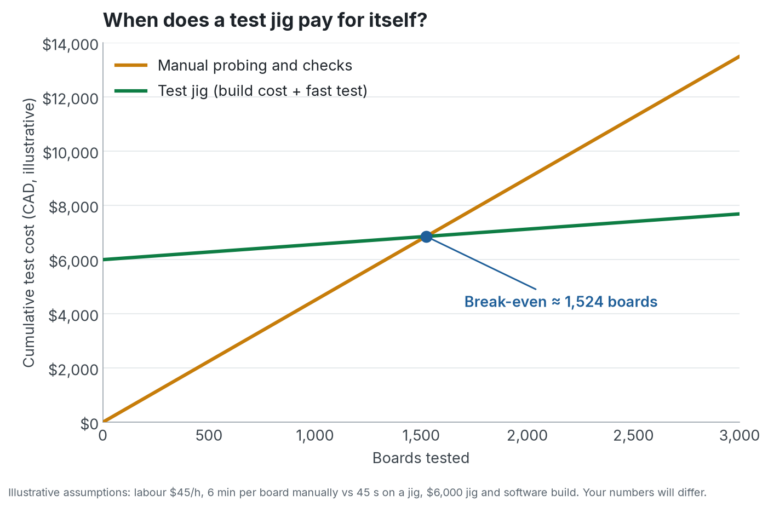
A jig has an up-front cost for the design, build and software. After that, each board costs very little to test. The chart below shows the idea with illustrative numbers. With the assumptions shown, the jig pays for itself after roughly 1,500 boards, and everything after that is savings. Your own break-even point depends on your test time, labour rate and jig complexity.
Volume is not the only reason. A jig can also be worth it for low volume products where a missed fault is expensive, such as equipment that is hard to reach or costly to service. For many Calgary-area industrial and field-deployed products, a failure on site costs far more than any test fixture.
Design the Board for Testing
The best test jigs start before the board is finished. Design for test (DFT) means planning the test strategy while the layout is still open:
- Add accessible test points for power rails, key signals and any node you need to measure.
- Keep test points on one side of the board where possible, which keeps the fixture simpler.
- Leave enough clearance around test points for the pogo pins and fixture hardware.
- Add a programming and communication header or pads if the firmware needs to be loaded or checked.
- Include tooling holes or fiducials that give the fixture a reliable way to locate the board.
This is closely related to the planning we described in our post on design for manufacturability. Boards that are easy to build are usually easier to test as well.
Jig, In-Circuit Test or Functional Test?
These terms overlap, so it helps to separate them. In-circuit test (ICT), often done on a bed-of-nails fixture, checks individual components and connections on the board. Functional test powers the board and checks that it actually does its job. A custom jig can do either or both, and many products use a combination: quick structural checks followed by a functional sequence and firmware programming. The right mix depends on the product, the volume and where defects tend to appear.
Our Test Jig Approach at Fusion Solution
At Fusion Solution we design test jigs and the software that runs them for custom PCBs. We start with what the board has to prove: which functions matter, which faults are most likely and what an operator needs to see. From there we plan test points with the design team, build the fixture and write the test software so the whole system is ready for production in Calgary. Because the jig and the board are designed with the same goals in mind, there are fewer surprises when production starts.
Ready to Test Every Board With Confidence?
If you are moving a product from prototype to production, or you are tired of boards failing after they ship, a test jig may be the fastest way to protect your quality. Talk to Fusion Solution about our PCB design, assembly and test services and we will help you plan a test process that fits your board.