

Your PCB layout is finished, the BOM is locked and the Gerbers are ready. One decision still has a direct effect on what you pay per board and how many good boards come off the line: PCB panelization. How your boards are arranged, held and separated on a manufacturing panel affects stencil printing, pick-and-place speed, reflow behaviour and depaneling stress. A good panel makes assembly fast and predictable. A poor one adds cost and defects that your schematic never shows.
What Is PCB Panelization?
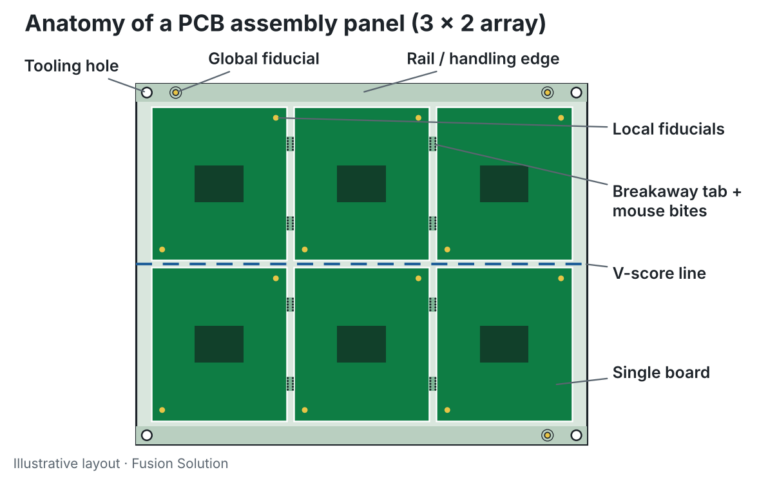
PCB panelization is the practice of grouping one or more circuit boards into a larger array, called a panel, so they can be fabricated, assembled and tested together. The panel adds handling rails, fiducials and tooling holes around the boards so SMT equipment can transport and align it accurately. After assembly, the individual boards are separated in a step called depaneling.
Panelization is not only a fabrication concern. Assembly lines have minimum and maximum board sizes, conveyor clearance needs and fixed machine load times. A small board loaded one at a time spends more time being transported and aligned than being populated. Put twelve of them on one panel and that overhead is shared twelve ways.
Why PCB Panelization Matters for Assembly Cost and Yield
- Higher throughput: one print stroke, one fiducial alignment and one reflow pass cover every board on the panel.
- Lower cost per board: fabrication is priced by panel area, so better material utilization means less waste and lower unit cost.
- Better print and placement accuracy: rigid, well-supported panels stay flat through the stencil printer and reflow oven.
- Safer handling: rails keep conveyor edges and fingers off components near the board edge.
- Easier testing: panels can be probed or programmed as a group before separation.
Key Elements of a Well-Designed Assembly Panel
Rails and Handling Edges
Rails are breakaway strips, usually 5 to 10 mm wide, along the conveyor edges of the panel. They give the machine something to grip and keep components clear of the conveyor. If parts or connectors sit within a few millimetres of your board edge, rails are effectively mandatory.
Fiducials and Tooling Holes
Global fiducials on the rails let the pick-and-place vision system locate the whole panel, while local fiducials on each board correct for small shifts board to board. Use at least three global fiducials placed asymmetrically so the machine cannot load the panel rotated. Non-plated tooling holes in the rail corners locate the panel in fixtures for printing, testing and depaneling.
Board Spacing and Orientation
Keep every board in the same orientation unless there is a strong reason not to. Mixed rotations complicate inspection and programming. Spacing is set by the separation method: V-scored boards can sit edge to edge, while tab-routed boards need a router gap, typically around 2 mm.
V-Score vs Tab-Routing: Choosing a Depaneling Method
The two most common ways to hold boards in a panel are V-scoring and tab-routing with breakaway tabs (often called mouse bites). Many production panels combine both.
V-Scoring
A V-shaped groove is cut into the top and bottom of the panel, leaving a thin web of material that is snapped or cut after assembly. V-scoring uses panel area very efficiently because boards share an edge, but the grooves must run in straight lines across the entire panel. It suits rectangular boards and requires components to be kept back from the score line to avoid cracked ceramic capacitors and stressed solder joints.
Tab-Routing with Mouse Bites
Each board is routed out of the panel except for small tabs, which are perforated with a row of small holes so they break cleanly. Tab-routing supports curved outlines, cut-outs and connectors that overhang the board edge. The trade-off is the routing gap, which uses panel area, and small tab remnants that may need sanding if the enclosure fit is tight.
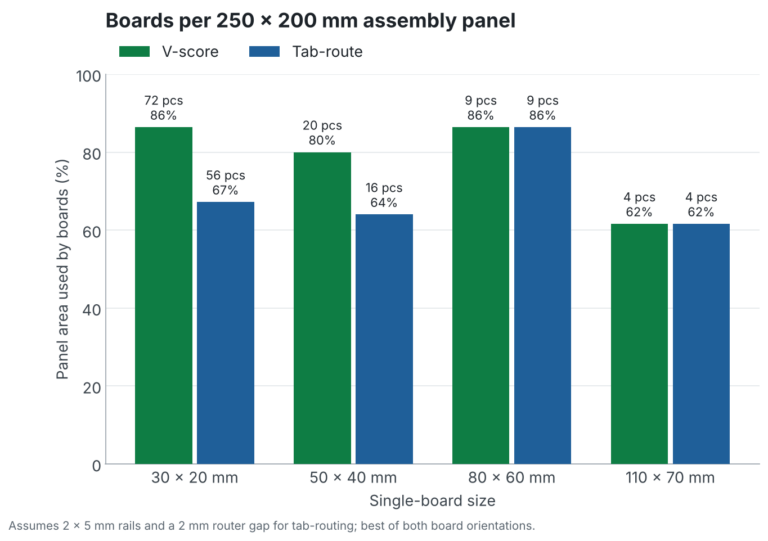
The chart above shows why this choice matters most for small boards. On a 250 × 200 mm assembly panel, a 30 × 20 mm board fits 72 times with V-scoring but only 56 times with a 2 mm routing gap, which is 22% fewer boards for the same panel cost. For larger boards, panel dimensions usually limit the count before spacing does, so both methods give the same result.
Common PCB Panelization Mistakes to Avoid
- Components too close to score lines or tabs: mechanical stress during depaneling can crack MLCCs and lift pads.
- Too few breakaway tabs: a panel that flexes in the printer or sags in reflow will produce bridging and opens.
- Overhanging connectors with no clearance: parts that extend past the board outline need a routed relief in the neighbouring board or rail.
- Missing or symmetric fiducials: the machine either cannot align the panel or aligns it rotated.
- Ignoring the oven and stencil: very large or very thin panels warp; very small ones may fall below conveyor limits.
- Not asking your assembler first: every line has its own preferred panel size, rail width and fiducial rules.

Our Panelization Approach at Fusion Solution
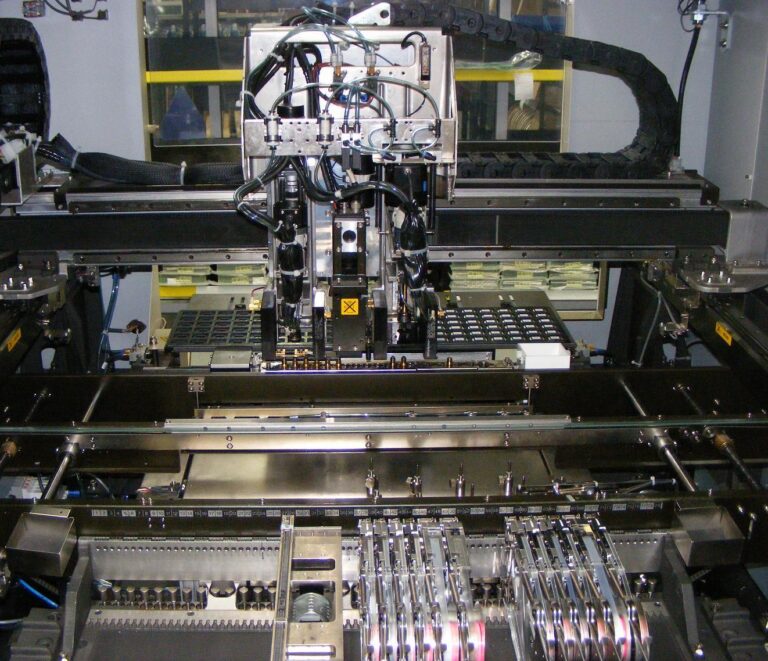
At Fusion Solution, panel design is part of our Design for Manufacturability (DFM) review on every PCBA job. Before a board goes to fabrication, our team checks component clearance to break lines, chooses the right mix of V-scores and tabs for your outline, places fiducials and tooling holes for our SMT line, and sizes the array to get the most good boards from each panel. If you already have a panel drawing, we review it against our equipment so there are no surprises on the production floor.
Ready to Panelize Your Next PCB?
Good PCB panelization is one of the cheapest ways to lower assembly cost and raise first-pass yield. It costs nothing to get right at the design stage, and it can cost a full production run to get wrong. Talk to our team in Calgary about your next build and we will help you design a panel that is fast to assemble, safe to separate and ready for volume.